
#1 · Best overall
Type
Wi-Fi (phone app)
Parent Unit Battery
Uses your phone
Range
Wherever you have Wi-Fi
Price (approx.)
$249

As an Amazon Associate, Parents Love Best earns from qualifying purchases. Learn more
The best baby monitor for travel packs small, sets up in minutes, and works in a hotel, a rental, or Grandma’s spare room. These 10 picks cover Wi-Fi, no-Wi-Fi and audio-only options.
The Nanit Pro with Flex Stand is the best baby monitor for travel because you can use the same camera at home and on the road.
The table below compares all 10 travel baby monitors by connection type, battery, range, and price. Prices were checked in November 2026 and change often, so confirm them on Amazon before you buy.


A travel baby monitor needs to be small, fast to set up, and able to run on battery through a full night. The features that matter in a nursery at home are different from what matters on the road. Here are the 16 criteria we used to rank every monitor on this list.
Wi-Fi monitors need internet. No-Wi-Fi (FHSS or DECT) monitors work anywhere, including cabins and cruise ships.
Hotel outlets are rarely beside the bed. Aim for 10+ hours with the screen on.
You may set up the monitor every night of the trip. Under five minutes is the goal.
Rentals do not allow wall drilling. Free-standing bases, clamps, or flexible arms are best.
The whole kit, including cables, should fit in one diaper bag pocket or a small pouch.
Every ounce counts in carry-on luggage. Lighter camera units are easier to move between rooms.
Hotels are shared wireless environments. Look for AES encryption or FHSS (frequency hopping) transmission.
Cameras that remember several networks reconnect faster when you move between home, hotel, and family.
Many hotel networks use a browser login page that smart cameras cannot pass. A backup plan matters.
A 3- to 5-inch screen is readable at night without making the parent unit bulky.
Unfamiliar rooms are often darker or brighter than your nursery. Infrared night vision covers both.
A quick "Mommy's here" can settle a baby in a strange room without you going in.
USB charging and a 100-240V adapter mean one less converter in your bag for international trips.
Hotel suites and rentals rarely exceed 100 feet, but beach houses and campsites need more.
Some smart features stop working without a paid plan. Know what is free before you leave.
You can spend under $50 or over $300. Match the spend to how often you travel.
Each travel baby monitor below was judged on packed size, setup time, battery, connection type, and price. Specs come from manufacturer pages and independent testing where available.
The Nanit Pro with Flex Stand is the best baby monitor for travel because you can use the same camera at home and on the road. It snaps into a small stand, connects to hotel or rental Wi-Fi, and streams to your phone, so there is no second screen to pack.
The biggest travel advantage is network memory. The camera stores up to 10 recent Wi-Fi networks, so a family that rotates between home, grandparents, and a favorite rental reconnects without starting setup over (Nanit, 2026).
The Flex Stand solves the mounting problem in rentals. It sits on a dresser or shelf near the crib and gives a full-room view instead of the overhead view of the wall mount. No screws, no adhesive strips, and no damage deposit worries.
Security is the strongest on this list. Nanit uses 256-bit AES encryption, double the 128-bit standard used by most competitors, plus two-factor login (Nanit, 2026). That matters on shared hotel networks where dozens of guests use the same router.
The trade-off is the Wi-Fi requirement. If the hotel uses a captive portal login page, the camera cannot join it. Pack a phone hotspot or a small travel router as a backup before you rely on Nanit for a trip.
One more note: some sleep tracking features are designed around the overhead wall mount or floor stand, so expect fewer analytics when the camera sits on the Flex Stand (SafeWise, 2026).
Parents who already use Nanit at home or want one smart camera for home and travel.
Families heading to places with weak or paywalled internet.
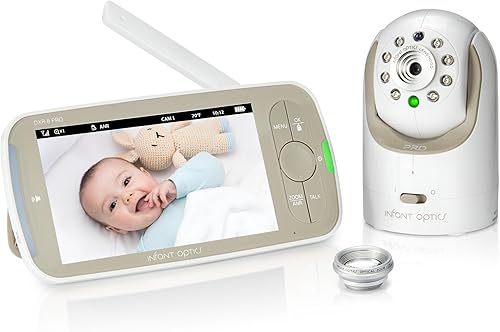
The Infant Optics DXR-8 PRO is the best travel baby monitor if you want video without depending on the internet. The camera and parent unit talk over a closed FHSS (Frequency Hopping Spread Spectrum) signal, so it works the same in a city hotel, a lake cabin, or a cruise cabin.
The no-internet design is the main reason to pack this monitor. You plug in the camera, turn on the parent unit, and you have video in about a minute. There is no app, no account, and no hotel Wi-Fi login standing between you and your baby.
Active Noise Reduction is useful in hotel rooms. Air conditioners and hallway noise can drown out a baby on cheaper monitors. The DXR-8 PRO filters steady background sound so you hear the baby, not the HVAC unit (Infant Optics, 2026).
The replaceable battery is a long-term perk. Parent units on most monitors have sealed batteries, so the whole unit becomes useless when the battery fades. Infant Optics sells replacement batteries, which extends the life of a monitor you plan to travel with for years.
Range claims need a reality check. The 1,000-foot figure is open-air. Independent testers at BabyGearLab found indoor range through several walls far shorter than the box claim, though still enough for a hotel suite or a typical rental.
Families who travel to places with poor Wi-Fi and want a dedicated video screen.
Parents who want to check in from outside the hotel or use sleep analytics.
The eufy SpaceView Pro is the best travel baby monitor for battery life. Its 5,200 mAh parent unit runs 12 hours with the screen on and 30 hours in default sleep mode, enough for a full night with no outlet near the bed (eufy, 2025).
Battery life is the reason this monitor makes the list. Many hotel and rental bedrooms have one outlet, and it is often behind the nightstand or across the room. A 30-hour sleep-mode rating means you can charge it during the day and forget about it at night.
The pan and tilt range helps in unfamiliar rooms. You will not always find a perfect spot for the camera. With 330 degrees of pan, you can set it on any dresser and steer the view toward the travel crib from the parent unit.
Setup takes minutes because there is no app. eufy ships the camera and screen pre-paired, so you plug in the camera and turn on the screen. That simplicity also makes it a good pick for grandparents watching the baby on a trip.
The weak spot is charging hardware. The SpaceView Pro uses Micro-USB cables, and some owners report battery packs fading after about a year of daily use. Pack the original cables, and keep the receipt for warranty claims.
Parents who want an all-night screen without plugging in.
Travelers who want remote viewing from outside the room or hotel.
The Hubble GoBaby AI Portable Pro is the best travel baby monitor if you want both options: a Wi-Fi app when the hotel internet works and a local parent unit when it does not. The kit also includes a camera battery pack, so the camera can run away from an outlet.
The hybrid connection is what sets it apart. On a trip with good Wi-Fi, you get app viewing and smart alerts. In a mountain cabin with no internet, you switch to the 5-inch parent unit and still have live video (Hubble Connected, 2026).
The camera battery pack is rare in this category. Most cameras on this list need an outlet within cord reach. A battery-powered camera lets you place it on the best shelf for the view, not the one nearest a socket, and keeps cords well away from the crib.
The 2K resolution is the sharpest on this list. Higher resolution helps when the camera sits farther away than usual, which happens often in hotel rooms where furniture placement limits your options.
The AI features are new, and the product has fewer long-term reviews than Nanit or Infant Optics. Treat covered face and rollover alerts as extra information, not as a safety device. The American Academy of Pediatrics (AAP) says no consumer monitor has been shown to prevent SIDS (AAP, 2022).
Families who split trips between connected hotels and remote rentals.
Minimalist packers who want the fewest possible pieces.
The Owlet Cam 2 is the best budget Wi-Fi baby monitor for travel. It streams 1080p video to your phone with no subscription required for live video, cry detection, and room temperature and humidity readings (Owlet, 2026).
The no-subscription model makes the Owlet Cam 2 cheap to own. Live video, sound and motion alerts, and cry detection all work through the free Owlet Dream app. That keeps the total cost close to the sticker price.
Temperature and humidity readings are more useful on the road than at home. Hotel rooms swing hot or cold, and you cannot always control the thermostat in a rental. A quick glance at the app tells you whether to add or remove a layer.
The magnetic base is small and easy to pack. It sits on a shelf or dresser without screws. Families who already use the Owlet Dream Sock can pair it with the camera, though the sock is optional and sold separately.
The camera does not pan or tilt, so placement matters. Some owners also report a long first-time setup. Do the initial pairing at home before the trip rather than in a hotel room at bedtime.
Budget-minded parents who want phone-based video on trips.
Parents who want a separate screen or work in places with poor internet.
The Lollipop Baby Camera is the best travel baby monitor for awkward rooms. Its bendable leg wraps around a crib rail, stands on a flat surface, or clips into the included wall mount, so you can place it almost anywhere.
The flexible leg solves the biggest travel headache: finding a spot for the camera. Travel cribs and pack-and-plays rarely sit near a good shelf. Reviewed.com noted the Lollipop can go in, on, or above a crib and is easy to use when traveling (Reviewed, 2026).
The 10-foot cable gives you room to work. You can run power from a distant outlet and still place the camera where it has a clear view. Keep the cord at least 3 feet from the crib, as the U.S. Consumer Product Safety Commission (CPSC) advises for all monitor cords (CPSC, 2011).
Crying detection reduces false alerts. Hotels have hallway noise, ice machines, and elevators. A camera that can tell a cry from a slammed door means fewer wake-ups for you.
The Lollipop weighs about 1.1 pounds, so it is not the lightest camera here. It is also app-only, which means no viewing when the Wi-Fi drops.
Parents who move between travel cribs, pack-and-plays, and unfamiliar rooms.
Families who want breathing tracking without a subscription.
The Miku Pro is the best travel baby monitor for parents who want breathing and sleep tracking without a wearable. Its SensorFusion technology reads breathing motion from the camera, so there is no sock or band to pack.
Breathing tracking without a wearable is the main draw. Socks and bands are one more item to pack, wash, and fit on a sleepy baby in a strange room. The Miku reads motion from above the crib instead.
Security is on par with Nanit. Miku uses 256-bit encryption plus two-factor login and a dedicated crypto chip on the device (Best Company, 2026). That is a good fit for families who worry about shared hotel networks.
Subscription terms have changed over time. Reviewed.com reported that Miku moved many analytics features to its paid Care+ plan, leaving live HD video as the core free feature (Reviewed, 2026). Check the current plan before buying if you chose Miku for free analytics.
Breathing data is for information only. The AAP found no evidence that home monitors prevent SIDS, and families who use them should still follow safe sleep guidelines (AAP, 2022).
Parents who want breathing data without a sock or band.
Budget travelers or anyone who wants everything included with the purchase.
The VTech VM819 is the most compact video baby monitor on this list. Its 2.8-inch parent unit slips into a pocket and runs up to 19 hours of video or 29 hours of audio on a single charge (VTech, 2026).
Size and battery make this a strong travel pick. The parent unit measures roughly 5 x 1.3 x 2.9 inches, so it fits in a jacket pocket on the walk to the hotel pool or restaurant downstairs.
The 19-hour video rating covers the longest travel days. A long drive, a late check-in, and a full night of sleep can all run on one charge. Audio-only mode stretches that to 29 hours.
Setup is plug-and-play. There is no app, no pairing, and no account. That makes the VM819 a practical second monitor to leave with grandparents or a hotel babysitter.
Owners report mixed range results. Some say the signal cuts out at short distances through walls, while others get full-house coverage. Test the range in your own home before the trip.
Parents who want the smallest possible video setup.
Anyone who wants a large screen or remote camera control.
The HelloBaby HB65 is the best travel baby monitor under $50 if you want video and remote camera control. It has a 3.2-inch screen, pan and tilt, two-way talk, and no Wi-Fi requirement.
Pan and tilt at this price is rare. Most monitors under $50 have a fixed camera. Remote control lets you correct the view from your bed if the baby rolls to the far side of the travel crib.
Battery life beats the claim in testing. BabyGearLab found the HB65 parent unit lasted well over 14 hours in normal use, more than double the manufacturer’s 6-hour claim (BabyGearLab, 2022).
Setup is quick. You plug in both units and turn them on. The single-level menu shows every option at the bottom of the screen, so a grandparent or sitter can figure it out without the manual.
The small screen is the trade-off. At 3.2 inches, details are harder to see than on 5-inch models. Video quality is good for a no-Wi-Fi monitor but cannot match 1080p app cameras.
Occasional travelers and grandparents who want cheap, simple video.
Parents who want HD video or smart alerts.
The VTech DM221 is the best audio-only baby monitor for travel. It costs around $40, uses a DECT 6.0 digital signal with no Wi-Fi, and runs up to 18 hours on the rechargeable parent unit (VTech, 2026).
Audio-only is the lightest way to monitor on a trip. There is no camera to aim and no screen to dim. You set the baby unit near the travel crib, clip the parent unit to your belt, and you are done.
The vibration alert helps in noisy settings. At a family dinner or a hotel restaurant, you may not hear a speaker. The parent unit vibrates and lights up when the baby makes noise, so you still get the alert.
Range indoors is shorter than the box suggests. VTech support has said the 1,000-foot range applies outdoors, with closer to 160 feet indoors (VTech, 2026). That still covers any hotel suite or vacation rental.
BabyGearLab gave the DM221 its Best Overall Audio Baby Monitor award, citing its feature set for the price (BabyGearLab, 2026). The only real limit is the lack of video.
Short trips, budget travelers, and parents who only need to hear the baby.
Parents who want to see the baby's position or sleep space.
A no-Wi-Fi baby monitor is the safer choice for most travel because it works anywhere, with no login or internet. A Wi-Fi monitor is better if you already own one, travel to well-connected places, and want to watch from outside the room.
(Nanit, Owlet, Lollipop, Miku) stream to your phone through the internet. Both parents can watch at once, and you can check in from the hotel lobby. The risk is hotel internet: slow speeds, crowded networks, and captive portal login pages that cameras cannot pass.
(Infant Optics, eufy, VTech, HelloBaby) create a private link between camera and parent unit using FHSS or DECT signals. Think of it like a walkie-talkie pair that only talks to each other. They work in cabins, cruise ships, and campsites, but you cannot watch from outside the signal range.
(Hubble GoBaby AI Portable Pro) do both. You get app viewing when the Wi-Fi works and a local parent unit when it does not.
for city hotels and familiar homes, a Wi-Fi monitor packs smaller. For remote rentals, international trips, or cruises, bring a no-Wi-Fi or hybrid monitor.
Set up a travel baby monitor the same way you would at home: camera out of reach, cords away from the crib, and nothing inside the sleep space. A new room makes these steps easy to skip, so follow them every night.
Place the camera and every cord at least 3 feet from the crib or pack-and-play, as the CPSC advises (CPSC, 2011).
Never attach a camera or cord to the inside of the travel crib, even if the mount allows it.
Keep the travel crib clear of blankets, pillows, and toys, following AAP safe sleep guidance (AAP, 2022).
Remember that no monitor replaces safe sleep habits. The AAP states there is no evidence that home cardiorespiratory or wearable monitors prevent SIDS, and families using them should still follow safe sleep guidelines (AAP, 2022). Read the full guidance on HealthyChildren.org.
The most common travel baby monitor mistake is assuming hotel Wi-Fi will work with a smart camera. These four mistakes cause most first-night problems on trips.
Many hotels use a captive portal, the login page that opens in your browser. Most baby cameras cannot get past it. Pack a phone hotspot or a pocket travel router, or choose a no-Wi-Fi monitor.
Hotel outlets are often far from where the crib goes. A short cord forces the camera too close to the crib. Pack a short extension cord and keep everything 3 feet away.
Check that each adapter is rated 100-240V before an international trip. A USB-powered monitor with a universal plug adapter is the easiest setup.
Pair and test the monitor at home first. A bedtime setup in a dark hotel room with a tired baby is the worst time to read a manual.
The Nanit Pro Camera with Flex Stand is the best baby monitor for travel overall. It remembers up to 10 Wi-Fi networks, sets up in seconds on its 3.5-inch stand, and uses 256-bit encryption. If you need a monitor without Wi-Fi, choose the Infant Optics DXR-8 PRO.
No-Wi-Fi baby monitors work in any hotel because they create their own private signal between camera and parent unit. Wi-Fi monitors work only if the hotel network allows device connections without a browser login page. Test your Wi-Fi monitor on a phone hotspot before the trip as a backup plan.
Yes, if it has a free-standing base and does not need a wall mount. Wi-Fi cameras like Nanit and Owlet travel well with a portable stand. Monitors that only come with screw-in wall mounts are harder to use in hotels and rentals.
A Wi-Fi baby monitor streams video through the internet to your phone, so you can watch from anywhere. A non-Wi-Fi baby monitor sends video over a private FHSS or DECT signal to a dedicated parent unit. Non-Wi-Fi models work without internet but only within their signal range.
Most hotel rooms and vacation rentals need under 100 feet of range. Open-air ratings like 1,000 feet drop sharply through walls, so a 1,000-foot rated monitor is a comfortable buffer. Range matters most at beach houses, campsites, and large rentals.
Wi-Fi baby monitors are safe on hotel networks if they use encrypted video streams. Nanit and Miku use 256-bit encryption, and the Owlet Cam 2 uses AES 128-bit encryption with a TLS connection (Owlet, 2026). Turn on two-factor authentication where the app offers it.
The VTech DM221 audio monitor is the lightest setup on this list because it has no camera or screen. For video, the VTech VM819 has the smallest parent unit at about 5 x 1.3 x 2.9 inches. If you use your phone as the screen, the Owlet Cam 2 and its magnetic base pack smallest.
No. Every monitor on this list shows live video or audio without a subscription. Nanit, Lollipop, and Miku charge for advanced features like sleep analytics, breathing tracking, or extended video history.
The Nanit Pro Camera with Flex Stand is the best baby monitor for travel for most families. It works at home and on the road, remembers 10 Wi-Fi networks, and has the strongest encryption on this list.
If your trips take you to places with weak internet, the Infant Optics DXR-8 PRO is the runner-up for its closed signal and noise reduction. For all-night battery, pick the eufy SpaceView Pro. On a tight budget, the VTech DM221 covers audio monitoring for around $40.
Looking for a monitor for home too? Read our full guide to the best baby monitors, or see our picks for the best baby monitor for twins if you are traveling with two little ones.